 TV Remote user guide
Settings
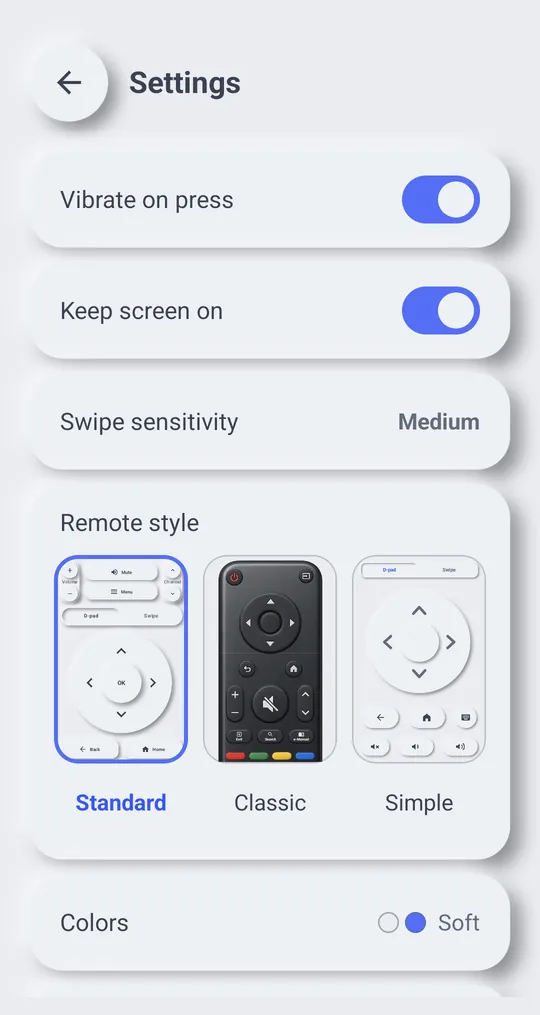
Tap the gear at the top right of the remote to open the settings. Changes apply right away.
Settings one by one
- “Vibrate on press”: a short vibration when you press a button.
- “Keep screen on”: the phone screen stays on while the remote is open.
- “Swipe sensitivity”: how far you need to swipe on the swipe pad for one arrow press.
- “Remote style”: “Standard”, “Classic” or “Simple”. The pictures show each layout. You can change it at any time.
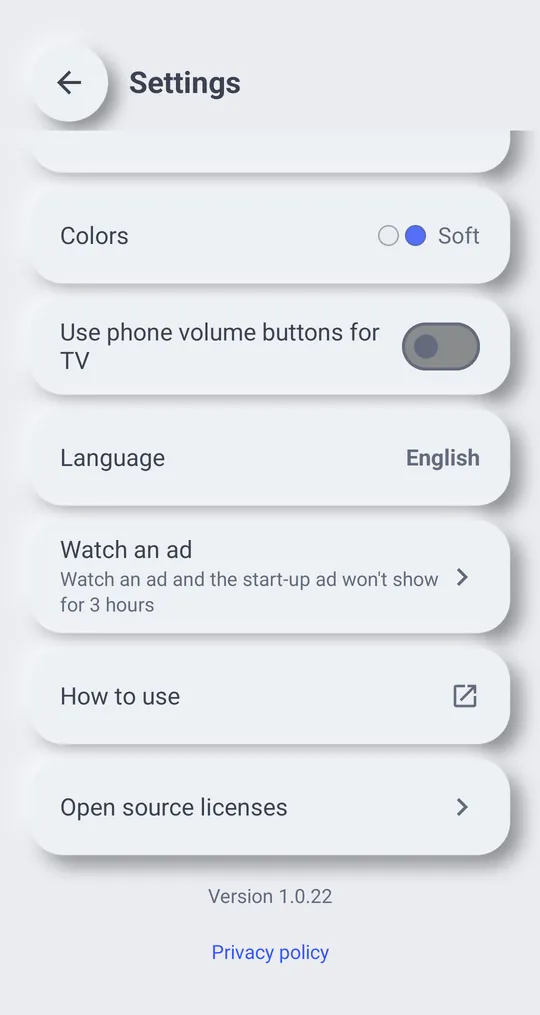
- “Colors”: color themes, including dark ones.
- “Use phone volume buttons for TV”: when on, the phone's volume buttons change the TV volume while the remote screen is open. See TV volume.
- “Language”: pick one of 15 language options or follow the phone language.
- “Watch an ad”: Watch an ad and the start-up ad won\'t show for 3 hours
- “How to use”: opens this guide.
- “Open source licenses”: licenses of the open source software in the app.
- “Privacy policy”: the link at the very bottom opens the privacy policy.